Streamline Your Next Celebration with the Notion Template Party Planner
Organizing a significant event, whether it's a milestone birthday, a corporate retreat, or a wedding, often involves juggling dozens of disparate pieces of information. You might have a spreadsheet for the budget, a document for the guest list, and a separate app for the timeline. This fragmentation is where details get lost and stress levels rise. The Notion Template Party & Event Planner is designed to consolidate these elements into a single, cohesive digital workspace, transforming a chaotic process into a manageable, even enjoyable, one.
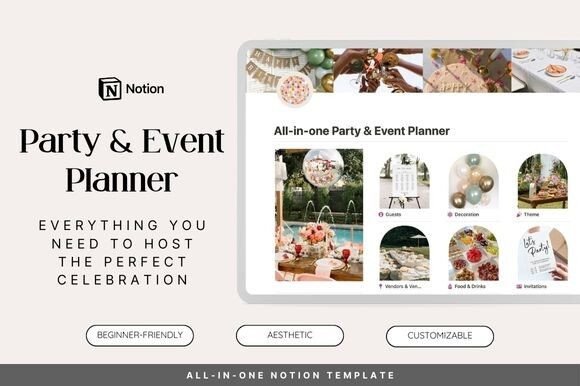
At its core, this template functions as a central nervous system for your event. It's built within Notion, a versatile productivity tool, but it arrives pre-structured with the specific databases, views, and properties needed for event management. Think of it not as a blank page, but as a fully equipped workshop where every tool has its place. The visual appeal is clean, modern, and intuitive, using clear headings, logical grouping, and subtle icons to guide you through the planning stages. Its personality is that of a calm, capable assistant—organized, flexible, and thorough.
A Visual and Functional Blueprint for Your Event
The template's design philosophy prioritizes clarity and efficiency. Its visual characteristics lean towards a minimalist, professional aesthetic that avoids unnecessary clutter. This isn't about flashy graphics; it's about creating a functional hierarchy that lets you see the big picture and drill down into the minutiae with equal ease. The style is adaptable, allowing you to personalize it with your own images and color accents while maintaining a strong underlying structure. Its overall appeal lies in its ability to make complex planning feel systematic.
Where this template truly excels is in its comprehensive sections, each acting as a dedicated wing of your planning headquarters. The Guestlist database is a prime example. It moves beyond a simple name-and-email list. You can track RSVP statuses, dietary restrictions, plus-ones, table assignments, and even gifts received. With Notion's filtering and sorting capabilities, you can instantly view all guests who haven't responded or generate a list of attendees with specific meal preferences for your caterer.
Similarly, the Decorations and Theme sections work in tandem to bring your creative vision to life. Here, you can brainstorm ideas, create mood boards using embedded images, list required items with their costs and sources, and track procurement status. This is where your event's personality starts to take shape. Paired with the Venues database, which helps you compare options based on capacity, cost, location, and amenities, you can make informed decisions that align both your aesthetic and logistical needs.
The logistical heavy lifting is managed through the Vendors & Suppliers and Food & Drinks sections. You can maintain a contact list for florists, photographers, and caterers, track contract deadlines, payment schedules, and delivery dates. The food planning area allows you to design menus, account for allergies, estimate quantities, and manage beverage supplies, ensuring every guest is well-served.
Integrating the Planner into Your Creative and Professional Workflow
For designers, marketers, and creative professionals, the value of a tool like the Notion Template Party & Event Planner extends beyond personal use. It demonstrates a powerful principle of modern typography and brand identity applied to information design: using structure, clarity, and intentional layout to create a seamless user experience. The template itself is a piece of design assets that solves a real-world problem, much like a well-crafted premium font solves a communication challenge.
Consider how this structured approach influences visual hierarchy. Just as a display font commands attention for a headline, the template's clear section headers guide your focus. The detailed databases function like the body copy set in a highly readable serif or sans serif font, presenting critical information without strain. This careful organization enhances professionalism and consistency, whether you're planning your own event or managing one for a client.
For small business owners and entrepreneurs, it can be a direct commercial asset. Using such a template to organize a product launch, a client appreciation dinner, or a team-building event projects competence and attention to detail. The principles of font pairing—selecting complementary typefaces for different roles—find a parallel in how you pair the template's databases with your own custom views or additional Notion pages for specific creative briefs or vendor communications.
Practical Guidance for Implementation and Customization
Adopting the Notion Template Party & Event Planner is straightforward, but a little forethought maximizes its utility. Start by duplicating the template into your own Notion workspace. Before entering any data, spend time exploring the pre-built views and properties. Understanding the existing structure is key to customizing it effectively without breaking its functionality.
Treat the template as a starting point, not a rigid cage. If you're a blogger planning a meet-up, you might add a property to the Guestlist database to track social media handles. A content creator could embed a video playlist in the Activities & Games section for inspiration. The template's strength is its flexibility, allowing you to mold it like a handwritten font adapts to different contexts while retaining its core character.
When evaluating if it's the right fit for your project, consider the scale of your event and your comfort with Notion. For a complex, multi-day conference, you might need to create additional linked databases for speakers and sessions. For an intimate dinner party, you might simplify by hiding unused properties. The goal is to reduce friction, not create it. Test the workflow by planning a small, low-stakes gathering first to familiarize yourself with the system.
Think about how the template's organized output can influence your event's tangible brand identity. The clear schedules, vendor lists, and guest data can inform the design of your invitations, signage, and thank-you cards. Having all your specifications at your fingertips ensures consistency across all your print and digital materials, from the packaging design of party favors to the social media graphics promoting the event.
Ultimately, the Notion Template Party & Event Planner is more than a digital checklist. It's a framework for thoughtful, creative event production. It acknowledges that a successful event is built on a foundation of meticulous planning, and it provides the tools to build that foundation with confidence. By centralizing your efforts, it frees up mental space, allowing you to focus on the creative and personal elements that will make your gathering truly memorable.