Watercolor Strokes for Procreate: Your Guide to Authentic Texture
There is a certain warmth and unpredictability that digital art often struggles to capture. The slight bleeding of ink on paper, the rich texture of pigment settling into the fibers of a cotton sheet—these are the details that make art feel handmade. For iPad users working in Procreate, achieving this look used to require complex layering and blending. However, with the right tools, such as the Watercolor Strokes for Procreate brush set, you can bridge the gap between digital precision and organic charm effortlessly. This isn't just about drawing; it is about adding a tangible personality to your work that resonates with viewers.
The Anatomy of the Brush Set
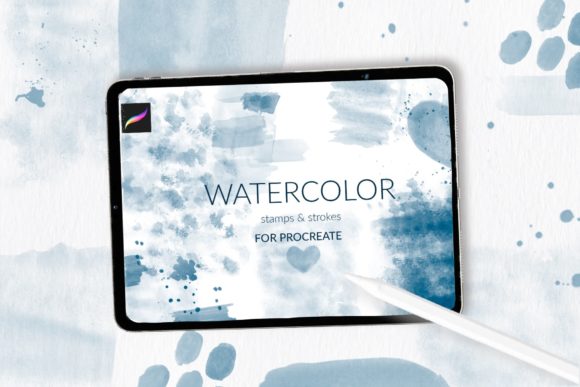
When you download Watercolor Strokes for Procreate, you aren't just getting a few generic brushes. You are receiving a curated collection designed specifically for texture and depth. The pack includes 31 distinct stamp brushes featuring various strokes and textures. These are perfect for creating decorative shapes and flourishes without needing to paint them from scratch. Additionally, the set comes with three watercolor splash stamps, which are ideal for adding dynamic energy to your compositions.
Perhaps the most practical tool in the collection is the watercolor cotton paper pattern brush. This allows you to create authentic backgrounds instantly, setting the stage for your typography and illustrations. When you use this premium font and texture combination, you create a cohesive brand identity that feels premium and tactile. It is a complete toolkit for anyone looking to master the watercolor aesthetic in modern typography and design.
Real-World Applications and Design Strategy
The versatility of these assets makes them valuable across a wide range of projects. If you are a graphic designer working on packaging design, these strokes can add a hand-crafted feel to product labels, especially for artisanal goods or organic products. For those in editorial design, the splashes work beautifully as background elements for magazine layouts or blog headers, ensuring that text remains readable while the page still feels vibrant.
Consider the world of wedding invitation design or greeting cards. Here, the soft, romantic nature of watercolor is highly sought after. Using the Watercolor Strokes for Procreate set, you can create custom borders and focal points that mimic high-end stationery. Furthermore, for sublimation design, having high-resolution, textured stamps is crucial for ensuring the final print looks professional rather than flat. This tool is essential for anyone serious about creative font application and visual hierarchy.
Integrating Texture with Typography
One of the most common questions in design is how to pair imagery with text. When using watercolor elements, you need to ensure your typography doesn't get lost. A common strategy is to pair these organic textures with a clean sans serif font or a modern serif font. The contrast between the structured text and the fluid watercolor strokes creates a balanced visual hierarchy.
For example, if you are creating a logo, you might use the watercolor strokes as a background wash behind a bold display font. This technique enhances brand perception by making the logo feel approachable yet artistic. Avoid pairing these strokes with overly complex script fonts or handwritten fonts unless they are spaced out well; otherwise, the design may become too busy and affect readability. The goal is to use the texture to support the message, not overpower it.
Technical Setup and Workflow
To get the most out of Watercolor Strokes for Procreate, proper installation is key. The set includes 34 + 1 brushes, delivered in a .brushset file for users on Procreate version 5.0 and newer. However, if you are using an older iPad or Procreate version 4.0 or earlier, you can request individual .brush files. The installation process for these individual files is straightforward: download the file to your iPad, tap and hold to share, and select "Open in Procreate."
Once installed, you will find these design assets ready to use. A practical tip for maintaining consistency in your projects is to set your canvas size to a high resolution (at least 300 DPI) before you begin. This ensures that the texture details remain sharp, whether you are designing for web design or print. By incorporating these stamps into your workflow, you streamline the creative process, allowing you to focus more on logo design and composition rather than rendering textures from scratch.
Ultimately, this brush set is more than just a collection of digital tools; it is a way to infuse your digital work with the soul of traditional art. Whether you are a seasoned designer or a hobbyist exploring social media graphics, these brushes provide the foundation for work that feels genuine, professional, and visually engaging.